First experience in automating processes with AI
AI is a powerful tool, and not using it to automate workflows would be irrational. This idea became the starting point for integrating the article-writing process with a neural network. The goal is to simplify and speed up the creation and editing of materials using automation based on one of the neural networks (in this case ChatGPT).
Original process
For comparison, let's describe the manual article preparation process before integration:
- write a draft;
- send it to ChatGPT;
- edit the result;
- obtain the HTML separately;
- separately translate into the other supported languages;
- transfer the results back into the article creation form;
- verify the final content.
By preliminary estimate, taking into account rechecks, the whole process can take up to 3–4 hours even with a ready draft.
Automation capabilities
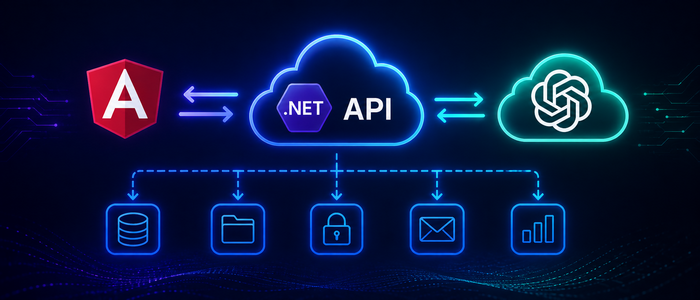
Obviously, steps 2–6 can be easily automated. The overall architecture of the process looks like this:
UI -> API -> OpenAI -> API -> UI
That is, the user interface does not call external services directly — the server side is responsible for that. The UI sends data to the server and displays the processed results.
Tasks the integration should solve
From the description of the manual process, three key operations to automate are evident:
- text editing;
- markup (HTML generation);
- translation.
For each operation it makes sense to create a separate API endpoint and use its own prompt. Note that the AI's responses may include control characters and formatting (for example, Markdown fences). Each prompt should explicitly state to return ONLY the required result (for example, Return only the translated text). Even with such an instruction, the AI may produce irrelevant output, so the processed result should be shown to the user for verification rather than saved directly to the database.
Security
An important aspect is the secure storage of access keys to AI services. Since using models is paid, key compromise can lead to significant financial losses. For Azure Container Apps there are two main approaches:
- built-in Azure Container Apps secrets;
- Azure Key Vault — a more feature-rich solution with broad integration capabilities.
For the current application the built-in Container Apps secrets are sufficient. However, it's important not only to store keys securely but also to protect API endpoints — for example, by adding the [Authorize] attribute to controllers and implementing appropriate authentication and authorization.
Azure — OpenAI integration
In Azure, the Azure OpenAI service is available for integration with OpenAI models. It allows you to create an AI project, deploy a model, test it, and track usage. Many settings are exposed in a separate portal https://ai.azure.com/, where it's convenient to choose models, monitor metrics, and estimate costs.
In practice, a small issue arose: when creating an AI project through https://portal.azure.com/, the project was sometimes added to the wrong resource group. The solution is to create the project through https://ai.azure.com/. In addition, the ai.azure.com portal makes it convenient to track the number of calls to the model and immediately see the usage cost.
Conclusion
After integration, the article preparation process was reduced to the following steps:
- write a draft;
- press the "Edit" button and verify the result;
- press the "Wrap in HTML" button and verify the result;
- press the "Translate" button and verify the result.
Time costs were reduced from about 3–4 hours to 20–30 minutes for checks. This example shows that the value comes not just from using AI in the browser, but from embedding AI capabilities into the business process, which allows significant time savings and reduced operating costs.